
Download Cam Scan PDF – Fast, Free PDF Converter for Android & iOS
Overview of Cam Scan PDF
Cam Scan PDF is a lightweight mobile application that turns photos of printed or handwritten documents into clean, printer‑ready PDF files. Unlike traditional PDF creators that require a desktop scanner, Cam Scan PDF lets you use the built‑in camera of your smartphone or tablet to capture a page, automatically removes perspective distortion, enhances contrast, and then embeds the result as an image‑based PDF page. The app is especially popular among students, artists, and small business owners who need a quick way to digitise notes, worksheets, sketches, or copyright‑protected artwork without exposing the underlying text to copy‑and‑paste attacks. While the tool does not perform OCR (optical character recognition) on screenshots, its image‑only output makes it a solid choice for protecting visual content and creating portable reference material. Cam Scan PDF is free to download, offers in‑app purchases for premium filters, and receives regular updates to improve processing speed, add new export options, and keep compatibility with the latest Android and iOS releases.
Key Features & Benefits
- Instant Photo‑to‑PDF conversion – Capture a document with your camera and generate a PDF in seconds.
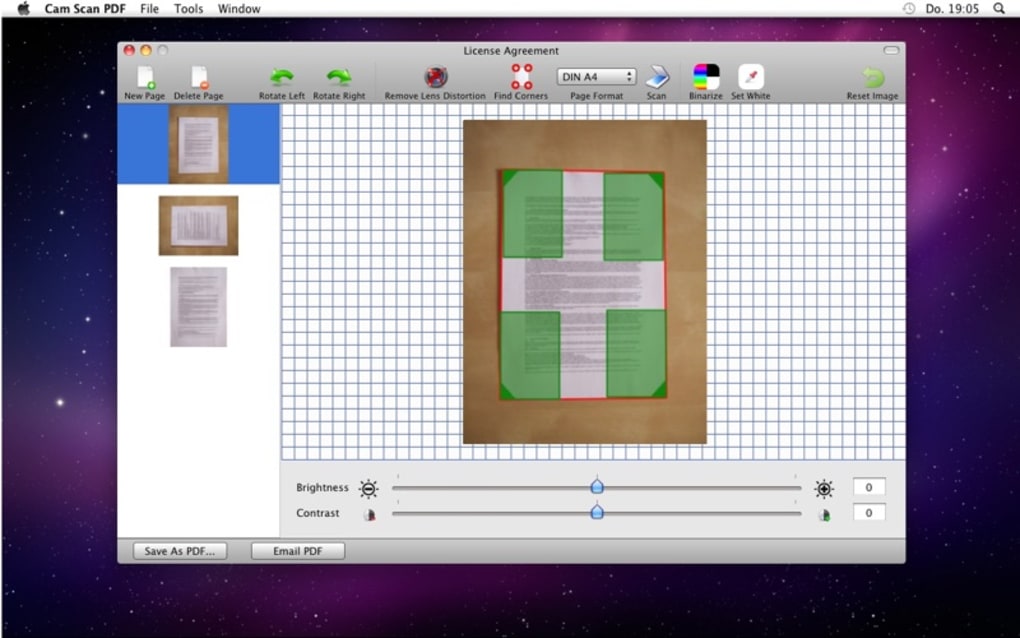
- Automatic perspective correction – The app detects and removes 3‑D distortion so every page looks flat and scanner‑like.
- Contrast and brightness enhancement – Built‑in image‑processing algorithms improve readability of faded or low‑light scans.
- Image‑only PDF output – By storing pages as images, the PDF prevents easy text extraction, safeguarding copyrights.
- Batch processing – Add multiple photos to a single PDF, reorder pages, and delete unwanted shots before export.
- Cloud integration – Directly save PDFs to Google Drive, Dropbox, or OneDrive for seamless sharing.
- Secure sharing options – Apply password protection or watermark your PDFs to deter unauthorized use.
- Cross‑platform support – Available for Android 7.0+ and iOS 12.0+, ensuring most modern devices are covered.
- Free core version – No subscription required for basic scanning; optional premium filters are available via in‑app purchase.
These features make Cam Scan PDF a versatile tool for anyone who needs a portable, secure way to digitise paper documents. Students often photograph textbook chapters, create personal study guides, and compile lecture notes without lugging a bulky scanner. Cartoonists and illustrators can protect their artwork by embedding it as an image‑only PDF, making it difficult for others to rip and reuse the drawings. Small business owners benefit from the quick invoicing workflow: snap a receipt, convert it to PDF, and upload it to accounting software. The app’s straightforward UI, combined with its powerful background processing, delivers a professional‑grade experience that feels native to mobile devices.
Installation, Usage Instructions, and Compatibility
How to Install Cam Scan PDF
Installing Cam Scan PDF is a breeze on both Android and iOS platforms. Open the Google Play Store or Apple App Store, search for “Cam Scan PDF,” and tap the Install button. The download size is under 30 MB, making it suitable for devices with limited storage. After installation, grant the app permission to access the camera, photos, and files – these are essential for capturing images and saving PDFs to your device or cloud accounts. The first launch includes a short tutorial that walks you through the capture workflow, page management, and export options.
Step‑by‑Step Usage Guide
1. Open the app and tap the camera icon. Position the document within the frame; the app will automatically highlight the edges.
2.
Capture the photo. If the lighting is uneven, use the built‑in flash or adjust exposure manually.
3. Review the preview. Cam Scan PDF shows a real‑time correction preview.
Use the “Retake” button if needed.
4. Add more pages. Continue scanning additional pages; each new photo appears as a thumbnail below the main view.
5. Reorder or delete pages. Drag thumbnails to change order, or tap the trash icon to remove mistakes.
6.
Export to PDF. Choose “Save as PDF,” set a file name, select a destination (device storage, Google Drive, Dropbox, etc.), and optionally enable password protection.
7. Share. Once saved, use the share button to email the PDF, send it via messaging apps, or open it in a PDF reader for final inspection.
Operating System Compatibility
Cam Scan PDF supports the following operating systems:
- Android 7.0 (Nougat) and newer – includes full support for ARM and x86 devices.
- iOS 12.0 and newer – optimized for iPhone, iPad, and iPod Touch with Retina displays.
- Tablet compatibility – both Android tablets and iPads benefit from the larger screen for easier page management.
Pros and Cons of Cam Scan PDF
Advantages
- Fast, on‑the‑go PDF creation without a physical scanner.
- Automatic perspective correction delivers professional‑looking pages.
- Image‑only PDFs protect copyrighted material from easy copying.
- Free core version with optional premium filters for enhanced output.
- Integrated cloud storage options simplify backup and sharing.
- Low storage footprint and smooth performance on most devices.
Drawbacks
- No OCR support – scanned images cannot be searched or copied as text.
- Limited editing tools; users cannot add annotations directly within the app.
- Premium features (e.g., advanced filters, unlimited batch size) require in‑app purchase.
- Image‑only PDFs result in larger file sizes compared to text‑based PDFs.
- Occasional glare detection issues on glossy pages, requiring manual retakes.
Cam Scan PDF delivers a highly convenient solution for mobile users who need to digitise documents quickly. Its strength lies in the flawless perspective correction and the security offered by image‑only PDFs. While the lack of OCR limits its usefulness for text‑heavy workflows, the app shines for artists, students, and anyone who values a simple, reliable scanning experience on a phone or tablet.
Frequently Asked Questions
-
Can Cam Scan PDF convert screenshots into searchable text?
No. Cam Scan PDF only creates image‑based PDFs. It does not perform OCR, so screenshots remain as pictures and cannot be searched or copied as text.
-
Is there a limit to the number of pages I can add to a single PDF?
The free version allows up to 20 pages per PDF. Premium users can create PDFs with unlimited pages and enjoy faster batch processing.
-
How secure are the PDFs generated by Cam Scan PDF?
Since the PDF stores pages as images, the text cannot be copied or extracted. You can also add password protection and watermarks to further secure the document.
-
Can I edit the scanned pages after the PDF is created?
Cam Scan PDF does not include a built‑in PDF editor. To annotate or edit pages, export the PDF and open it in a dedicated PDF editing app.
-
Does the app work offline?
Yes. All scanning and PDF generation functions are available offline. Cloud saving and backup require an internet connection.
Conclusion – Should You Download Cam Scan PDF?
If you need a fast, reliable way to turn paper documents into PDF files directly from your phone, Cam Scan PDF is a solid choice. Its automatic perspective correction and image‑only output give you professional‑looking PDFs while protecting the visual content from casual copying. The free version covers most everyday scenarios, and the optional premium upgrades unlock larger batch sizes and advanced filters for power users. While the lack of OCR may steer text‑heavy users toward alternatives, students, artists, and small business owners will find the security and convenience of Cam Scan PDF invaluable. Download it today, test the free features, and decide whether the premium add‑ons are worth the investment for your workflow.







